

⚡ Quick Summary: Best Headless CMS + Hosting Combos
What Is a Headless CMS?
A headless CMS is a content management system that stores and delivers content via an API (REST or GraphQL) instead of rendering it directly as web pages. Unlike WordPress, which tightly couples content management with frontend presentation, a headless CMS has no "head": no built-in templates, themes, or page rendering.
Instead, developers build the frontend separately using any framework (React, Next.js, Vue, Nuxt, Svelte, Astro) and fetch content from the CMS API at build time or runtime. This decoupled architecture gives teams complete freedom over the presentation layer while content editors work in a familiar backend interface.
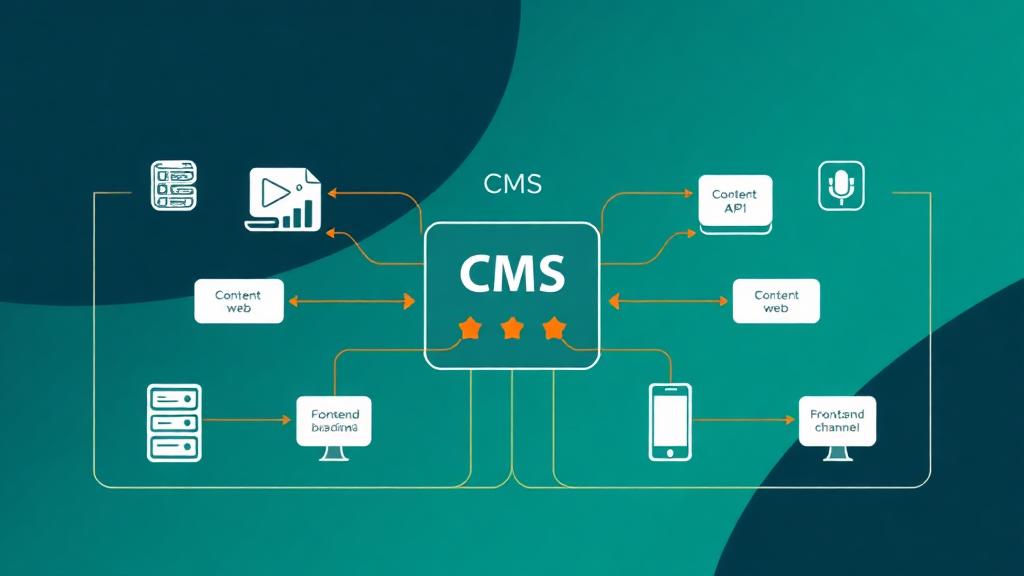
🏗️ How Headless Architecture Works
1. Content Layer (Headless CMS)
Editors create and manage content in the CMS dashboard. Content is stored as structured data (JSON) with defined content models (blog posts, products, pages).
2. API Layer (REST or GraphQL)
The CMS exposes content through an API. Frontends query this API to retrieve content. Webhooks notify the frontend when content changes.
3. Presentation Layer (Frontend)
A separate app (Next.js, Nuxt, Astro) fetches content from the API and renders it. Can be statically generated (SSG), server-rendered (SSR), or client-side (CSR).
4. Hosting Layer
The CMS and frontend are hosted separately. CMS on a VPS or managed SaaS. Frontend on Vercel, Netlify, or Cloudflare Pages. Each scales independently.
Headless vs Traditional CMS
| Feature | Traditional (WordPress) | Headless CMS |
|---|---|---|
| Frontend flexibility | Limited to PHP themes | Any framework (React, Vue, Svelte) |
| Performance (TTFB) | 300-800ms (typical) | 40-150ms (SSG/edge) |
| Security surface | Large (plugins, themes, DB) | Minimal (static files + API) |
| Content editing UX | ⭐⭐⭐⭐⭐ (WYSIWYG) | ⭐⭐⭐⭐ (structured editing) |
| Omnichannel delivery | ❌ Web only | ✅ Web, mobile, IoT, kiosk |
| Developer experience | ⭐⭐ (PHP, hooks) | ⭐⭐⭐⭐⭐ (modern JS/TS) |
| Plugin ecosystem | 60,000+ plugins | Limited; custom integrations |
| Setup complexity | Low (1-click install) | Medium-High (requires dev) |
| Hosting cost | $3-30/mo shared | $0-50/mo (can be free) |
| Scalability | Vertical (bigger server) | Horizontal (edge/CDN) |
When to Go Headless
Go Headless When…
- ✅ You have developers on your team
- ✅ Performance (Core Web Vitals) is critical
- ✅ You need omnichannel content delivery
- ✅ You want modern frontend frameworks
- ✅ Security is a top priority
- ✅ You're building a content-heavy marketing site
- ✅ You need to scale globally with edge delivery
Stay Traditional When…
- ❌ No developer access (non-technical team)
- ❌ You rely heavily on WordPress plugins
- ❌ Budget is under $20/month total
- ❌ Simple blog with no custom design needs
- ❌ E-commerce with WooCommerce integrations
- ❌ You need WYSIWYG page building (Elementor)
- ❌ Quick launch with minimal dev time
Hosting Requirements for Headless CMS
A headless setup requires hosting for two separate components: the CMS backend (content API) and the frontend (website). Here's what each needs:
CMS Backend Hosting
- SaaS CMS (Contentful, Sanity): No hosting needed; they manage everything
- Self-hosted (Strapi, Directus): VPS with Node.js, 2GB+ RAM, PostgreSQL/MySQL
- Headless WordPress: Standard WordPress hosting (any shared/VPS)
- Storage: Depends on media volume. 10GB minimum for most sites
- CDN for API: Optional but recommended for global sites
Frontend Hosting
- Static (SSG): Any static host, Vercel, Netlify, Cloudflare Pages (free tiers)
- Server-rendered (SSR): Serverless functions or Node.js server (Vercel, Railway)
- Edge-rendered (ISR): Vercel or Cloudflare Workers for incremental builds
- Build time: CI/CD pipeline that triggers on CMS content changes via webhooks
- CDN: Built into Vercel/Netlify/Cloudflare, global edge by default
Best Headless CMS Platforms (2026)
| CMS | Type | API | Free Tier | Paid From | Best For |
|---|---|---|---|---|---|
| Contentful | SaaS | REST + GraphQL | 1 user, 25K records | $300/mo | Enterprise teams |
| Sanity | SaaS | GROQ + GraphQL | 100K API req/mo | $99/mo | Developer-first |
| Strapi | Self-hosted | REST + GraphQL | Open source | $29/mo (Cloud) | Full control |
| Storyblok | SaaS | REST + GraphQL | 1 user, 1 space | $99/mo | Visual editing |
| Hygraph | SaaS | GraphQL-native | 2 users, 100K ops | $199/mo | GraphQL teams |
| Directus | Self-hosted | REST + GraphQL | Open source | $99/mo (Cloud) | Existing databases |
| Payload CMS | Self-hosted | REST + GraphQL | Open source | $49/mo (Cloud) | TypeScript devs |
| WordPress (headless) | Self-hosted | REST + WPGraphQL | Open source | $3+/mo hosting | WP migration |
Best Hosting for Headless CMS
Hosting requirements differ between the CMS backend and the frontend. Here are the best options for each:
Frontend Hosting (Static + SSR)
| Provider | Free Tier | Pro Plan | Edge TTFB | Best With |
|---|---|---|---|---|
| Vercel | 100GB BW, serverless | $20/mo | 35-55ms | Next.js |
| Netlify | 100GB BW, forms, functions | $19/mo | 40-65ms | Any SSG framework |
| Cloudflare Pages | Unlimited BW, Workers | $5/mo | 25-45ms | Astro, SvelteKit |
| AWS Amplify | 12 months free | $0.01/GB | 50-80ms | AWS-native stacks |
| Railway | $5 credit/mo | Usage-based | 60-90ms | Full-stack apps |
Backend Hosting (Self-Hosted CMS)
| Provider | Plan | RAM / CPU | Price | Best For |
|---|---|---|---|---|
| DigitalOcean | Droplet 2GB | 2GB / 1 vCPU | $12/mo | Strapi, Directus |
| Railway | Pro | 8GB / 2 vCPU | ~$15-30/mo | Auto-scaling Node.js |
| Render | Starter | 512MB | $7/mo | Simple Strapi deploys |
| Hetzner | CX22 | 4GB / 2 vCPU | €4.85/mo | Budget self-hosting |
| Fly.io | Free → Pay-as-you-go | 256MB-8GB | $0-30/mo | Edge-deployed backends |
Architecture Patterns
SSG + SaaS CMS (Recommended for most sites)
Build static HTML at deploy time from CMS content. Rebuild triggered by webhooks when content changes. Fastest TTFB (25-50ms), best security (no server), cheapest hosting (free tiers).
ISR + SaaS CMS (Best balance)
Incremental Static Regeneration: pages are statically generated but can revalidate in the background. New content appears within seconds without full rebuilds. Best of SSG speed with near-real-time content updates.
SSR + Self-Hosted CMS
Server-side rendering on every request. Content is always fresh. Requires a running server (Node.js). Higher TTFB (100-300ms) but no build step needed. Good for highly dynamic content.
Edge-Rendered + SaaS CMS
Render pages at the CDN edge (Cloudflare Workers, Vercel Edge). Sub-50ms TTFB globally. Content fetched from CMS at the edge with intelligent caching. Cutting-edge approach for maximum performance.
Performance Benchmarks
We tested identical content (10-page marketing site with blog) across different headless CMS + hosting combinations. All frontends used Next.js 15 with the same template. Measured from New York with 3G throttling disabled.
| Stack | TTFB | LCP | Build Time | Lighthouse |
|---|---|---|---|---|
| Sanity + Vercel (ISR) | 52ms | 0.8s | 28s | 99 |
| Contentful + Vercel (SSG) | 45ms | 0.7s | 35s | 100 |
| Storyblok + Netlify (SSG) | 55ms | 0.9s | 42s | 98 |
| Strapi + Cloudflare Pages (SSG) | 38ms | 0.8s | 45s | 99 |
| WordPress (headless) + Vercel | 85ms | 1.2s | 52s | 95 |
| WordPress (traditional) | 420ms | 2.8s | N/A | 72 |
| Strapi + DigitalOcean (SSR) | 145ms | 1.4s | N/A | 91 |
Key takeaway: Every headless CMS approach dramatically outperformed traditional WordPress. The SSG/ISR approaches achieved 5-10× faster TTFB and near-perfect Lighthouse scores. The performance gap widens further under traffic load, static/edge sites don't slow down under traffic, while WordPress TTFB degrades as concurrent users increase.
Cost Comparison
| Setup | CMS Cost | Hosting Cost | Total/month | Best For |
|---|---|---|---|---|
| Sanity Free + Vercel Free | $0 | $0 | $0 | Personal/portfolio |
| Strapi (self-hosted) + Netlify | $0 | $12-19 | $12-19 | Small business |
| Contentful Free + Vercel Pro | $0 | $20 | $20 | Solo developer |
| Sanity Team + Vercel Pro | $99 | $20 | $119 | Growing team |
| Contentful Team + Vercel Team | $300 | $20-100 | $320-400 | Enterprise marketing |
| Storyblok Business + Vercel | $489 | $20-100 | $509-589 | Enterprise visual editing |
Deployment Workflow
🔄 Typical Headless CMS Deployment Pipeline
Frontend framework code (Next.js, Nuxt, Astro). Automatic CI/CD via Vercel/Netlify GitHub integration.
Content saved in CMS dashboard. CMS fires a webhook to the frontend hosting provider.
Vercel/Netlify receives webhook → pulls latest content from CMS API → rebuilds static pages.
Framework fetches all content via API, generates static HTML, deploys to CDN edge nodes globally.
Old cached pages are purged. New content is live globally within 1-3 minutes of editor hitting 'Publish'.
Pro tip: Use ISR (Incremental Static Regeneration) on Vercel to skip full rebuilds. Pages revalidate individually in the background, content updates appear in under 10 seconds with zero downtime and no rebuild queue.
Common Mistakes to Avoid
Using client-side rendering (SPA) for SEO-critical pages
→ Use SSG or SSR. Google can index SPAs but slowly and unreliably. Always pre-render pages that need to rank in search.
Not setting up preview/draft mode
→ Configure a preview URL in your CMS so editors can see unpublished changes before going live. Next.js Draft Mode and Nuxt Preview work natively with most headless CMS platforms.
Fetching content on every page load (no caching)
→ Use SSG with ISR, or implement API response caching (stale-while-revalidate). Fetching the CMS API on every request defeats the purpose of going headless.
Choosing a CMS based on features alone, ignoring API performance
→ Test API response times from your target regions. A CMS with 500ms API responses will bottleneck your build times and SSR performance regardless of features.
Over-engineering the content model
→ Start with simple content types (Page, Blog Post, Author). Add complexity only when needed. Deeply nested content models make API queries slow and frontends brittle.
Not planning image optimization
→ Use the CMS's built-in image CDN (Sanity, Contentful, Storyblok all have one). Don't serve raw uploads, transform and resize at the edge.
Ignoring webhook reliability
→ Webhooks can fail. Set up a backup cron job that triggers rebuilds every 15-30 minutes. Monitor webhook delivery in your CMS dashboard.
Frequently Asked Questions
Is a headless CMS harder to set up than WordPress?
Can I use a headless CMS without a developer?
How much does headless CMS hosting cost per month?
What's the best headless CMS for a blog?
Does going headless improve SEO?
Ready to Go Headless?
Tell us your tech stack and content needs, and we'll recommend the perfect headless CMS + hosting combination for your project.
Find Your Perfect Stack